Android app out now · free until 31 October

Ride together,
live.

One route for the whole group, and everyone on one map while you move. Tap STOP and every phone in the group sounds it. Hold to talk. Nobody gets left at a turn.

Trekov 2.13 for Android · 85 MB · iPhone: add it from Safari today, App Store coming soon.

Pre-release offer: everything is free until 31 October 2026 — nothing to pay, no card needed.

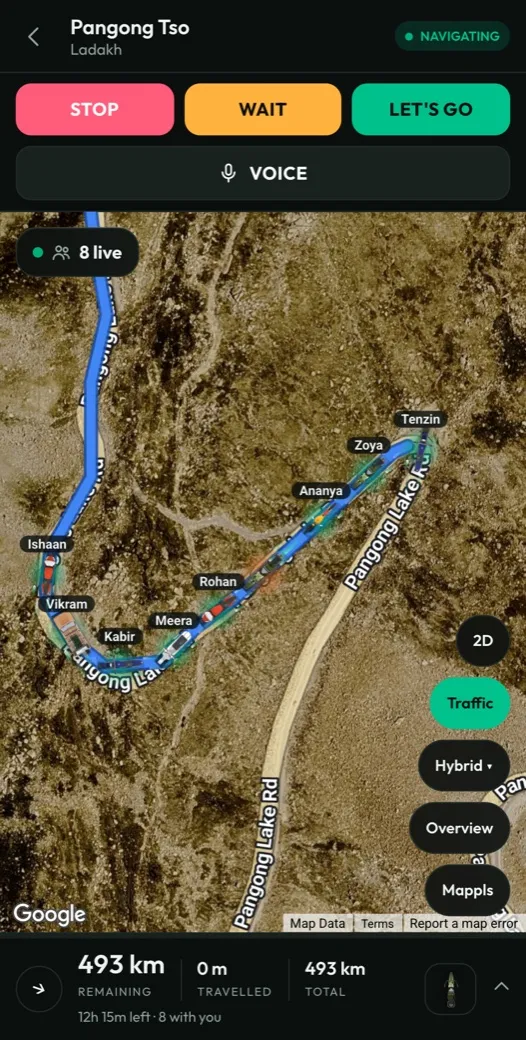
A Ladakh group ride navigating to Pangong Tso: eight riders live on a satellite map, with STOP, WAIT, LET'S GO and push-to-talk
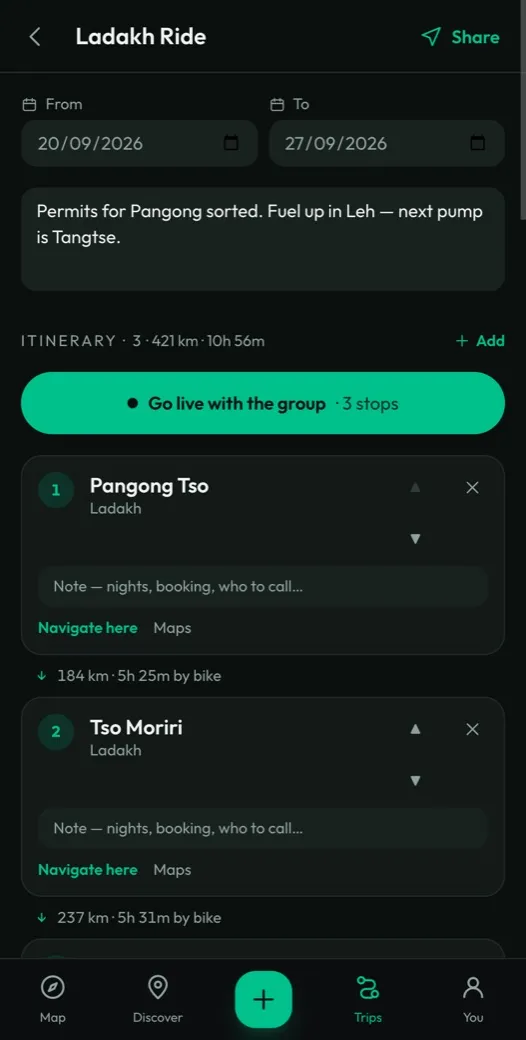
The Ladakh Ride itinerary: dates, notes, and three stops from Pangong Tso to Tso Moriri with the distance and time between them

How it works

Plan it. Bring the crew.
Ride it live.

Plan the route

Build a trip from real places, in the order you will ride them. Trekov gives the distance and time between every stop — and the fuel, food, stays and tolls along the way.

Bring your crew

Invite riders by their handle, or open the ride so others can find it and ask to join. You approve everyone, and pick a captain to lead.

Ride it live

Everyone on one map with turn-by-turn navigation, one-tap alerts and push-to-talk — and the map downloaded for the stretches with no signal. Back home, the route becomes a reel worth posting.

The host runs the ride

Nine on the road.
One list, one captain.

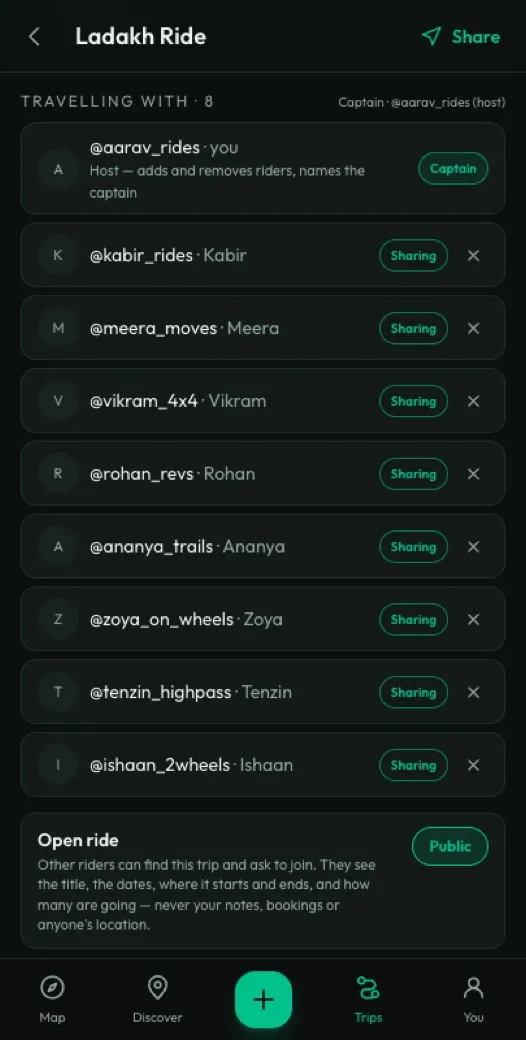
Whoever creates the trip is the host. Everyone else joins because the host said yes — so the live map only ever shows the people you are actually riding with.

  • Invite riders by their handle, or share the trip as a link that opens even without the app.
  • Open the ride so other riders can find it, then approve each one who asks to join.
  • Name a captain for the group to follow — yourself, or any rider on the trip. Only the two of you can change the plan.
  • See who is sharing their position, and hide yours from one person while the rest still see you.
The Ladakh Ride rider list: the host as captain, eight riders sharing their location, and the ride set to Public

Built for the road

Everything a group ride needs,
on one screen.

A group chat full of "where are you?" does not work at 60 km/h. Trekov puts the route, the riders and the conversation on the map you are already looking at.

Everyone on one map

See every rider live — where they are, which way they are heading and how fast — with the whole route drawn under them.

STOP · WAIT · LET'S GO

One tap and every phone in the group flashes full screen, buzzes and sounds a loud alarm — made to cut through wind and a helmet.

Push-to-talk

Hold the button and say it to the whole group. Nothing is sent unless you are holding it, and nothing is recorded.

Route animator New

Turn any ride into a video for Instagram: your bike riding the route, the road ahead solid and the part behind it fading. Flat 2D or 3D with the real mountains standing up, your vehicle and colours, 1080p or 4K, made on your phone.

Rider ID on your lock screen New

While you ride, your blood group, emergency contact and whether you're insured sit on your locked phone — with a button that dials your contact. Whoever reaches you first doesn't need your passcode. Android; on iPhone, use Apple's Medical ID.

Open rides New

Make a group trip public and other riders can find it and ask to join. You approve each one — until then they see only the title, the dates and where it starts and ends.

A host and a captain

Whoever creates the ride runs it: adds and removes riders, and names a captain for the group to follow. Only those two can change the plan — the name, the dates, the stops and the bookings; everyone else sees it as it is. A rider asking to join reaches the host's phone even with Trekov closed.

Navigation that stays on

Turn-by-turn with the group still on the map. The screen stays awake, it warns you when you leave the route, and a dropped signal never wipes the line you are following.

Maps that work offline

Download the route before you go, so the map and your position still work in the valleys where the network gives up.

Find where to go

Stays, food, fuel, garages, rentals and things to see near you or your route — with photos from riders who were actually there, and their profiles one tap away.

Rides you've done

Mark a ride completed when you get back and it moves to its own list, route and notes kept, ready to turn into a reel. Reopen it if you're running it again.

Your location, your rules

Your live position goes only to the people on your trip, and is never stored on our servers. Switch sharing off, or hide from one rider while the rest still see you.
Get the app

On your phone, before the stores.

Trekov is on its way to Google Play and the App Store. Until then, download it straight for Android, or put it on your iPhone Home Screen from Safari.

Android

App · Download now Google Play · Coming soon

The full app, signed by us — live group map, alerts, push-to-talk, notifications and offline maps. It keeps itself up to date once installed.

  1. Download the app — Android 7 or newer.
  2. Open the file and allow your browser to install it, then sign in.
Download Trekov 2.13

85 MB · Step-by-step install guide

iPhone

Web app · Add now App Store · Coming soon

Apple only allows apps from the App Store, so there is nothing to download yet. Until it lands, run Trekov from Safari — it goes on your Home Screen with its own icon.

  1. Open trekov.com/app in Safari.
  2. Tap Share, then Add to Home Screen.
Open Trekov and add it

Notifications and screen-off tracking arrive with the App Store version.

Questions

Before you ride.

What is Trekov?

Trekov is an app for group rides. The whole group follows one route and sees each other live on one map, with one-tap STOP, WAIT and LET'S GO alerts, push-to-talk and turn-by-turn navigation.

Is Trekov free?

Everything is free for everyone until 31 October 2026. There is nothing to pay and no card is needed.

Does it work without mobile signal?

Yes. Download the route before you go, and the map and your position still work in the stretches where the network gives up.

Who can see my location?

Only the people on your trip. Your live position is never stored on our servers, and you can switch sharing off or hide from one rider while the rest still see you.
How do riders join a trip?

The host invites riders by their handle or shares the trip as a link. The host can also open the ride so other riders can find it and ask to join; the host approves each one.

Who sees my blood group and emergency contact?

Nobody but you. They are kept in your own account, shown only on your own phone's lock screen while you're riding, and are never visible to other riders — not even the host of a ride you're on.

How do I get Trekov on an iPhone?

Open trekov.com/app in Safari, tap Share, then Add to Home Screen. The App Store version is on its way.

Is the Android download safe?

The Android app is signed by us and needs Android 7 or newer. Your phone shows its standard warning for anything not from the Play Store, and the app keeps itself up to date once installed.

Sign up

Your map, on every device.

Free for everyone until 31 October 2026. Enter your email and we'll send a one-time link — no password to set. Your trips, saved places and photos then sync between your phone and laptop, and friends you invite can ride along on your trips.

Already have an account? Sign in

Run a stay, dhaba, garage or rental on a riding route? List your business